Valuable Insights from "Copy This Funnel, It'll Blow Up Your Business"

In the world of digital marketing, entrepreneurs are always on the lookout for effective strategies to automate and optimize their sales processes. Chris Shupe's insightful video, "Copy This Funnel, It'll Blow Up Your Business," offers valuable lessons on how to create an effective automated sales funnel that can significantly boost your business's performance.
Key Points:
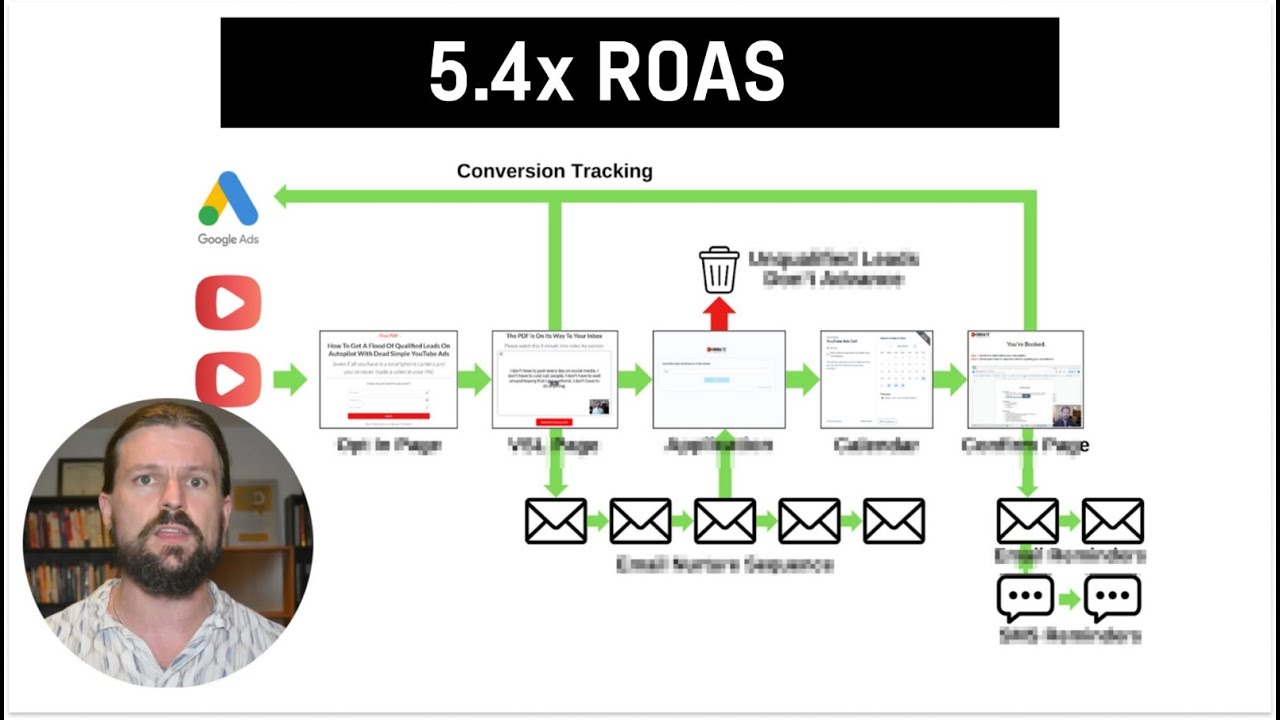
- Automated Sales Funnel: The speaker emphasizes the effectiveness of an automated sales funnel, which fills calendars with high-ticket sales calls, allowing for more freedom and reducing burnout.
- YouTube Ads Focus: Highlights the benefits of using YouTube ads for better control over spending and audience reach, advocating for paid ads over cold outreach.
- Detailed Funnel Walkthrough: A step-by-step breakdown of the funnel setup is essential for success.
- Target Audience Strategy: Understanding market demographics is crucial for targeting the right audience to maximize engagement and conversion rates.
- Engagement and Conversion Techniques: The use of automated processes and email sequences helps maintain engagement and maximize conversions.
Insights:
- Avoiding Burnout: The speaker shares personal experiences regarding work-life balance, suggesting automation can enhance the entrepreneurial journey.
- Power of Paid Advertising: Investing in paid advertising offers freedom and reliability compared to traditional outreach methods.
- Nuance in the Funnel Setup: Small details in funnel setup can significantly impact overall effectiveness, illustrating the complexity of marketing funnels.
Actionable Advice:
- Implement YouTube Ads: Start incorporating YouTube ads into your marketing strategy to run ads in the background.
- Funnel Structure Awareness: Familiarize yourself with the essential components of an effective sales funnel.
- Targeting Audience: Invest time in researching your target audience for better-tailored ads.
- Utilize Automation Tools: Explore automation tools for customer engagement post-initial contact.
- Continuous Learning: Seek additional resources on crafting effective ads within the funnel system.
Supporting Details:
- The speaker's success with multiple six-figure businesses lends credibility to the strategies discussed.
- Specific tools and processes cited can serve as valuable references for replication.
Personal Reflections:
The insights resonate with the challenges many entrepreneurs face regarding sustainable marketing efforts. The focus on automation simplifies the sales process while leveraging technology enhances business efficiency. The reliance on YouTube ads for targeted outreach aligns with modern digital marketing trends. Overall, these strategies offer a clear pathway for increasing business sales potential while minimizing traditional marketing's manual demands.
Watch the Full Video:
To join me on this learning journey, follow me on my social media: